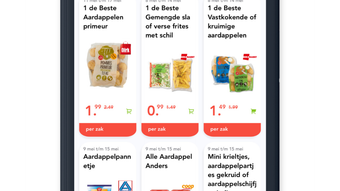

Whatsuper: Shop Smarter with Real-Time Deals
Overview
Whatsuper is a mobile application designed for iPhone users seeking a streamlined way to track supermarket promotions. Developed by Gerwim Feiken, the app falls within the Lifestyle category, specifically targeting individuals who prioritize budget-conscious grocery shopping. Its primary purpose is to consolidate promotional offers from major supermarket chains into a single, accessible interface.
This allows users to quickly identify discounts, compare deals across retailers, and plan their shopping trips efficiently. The app is particularly beneficial for busy professionals, families, and cost-aware consumers who want to maximize savings without spending excessive time comparing offers manually. Real-world usage scenarios include checking daily deals before heading to the store, setting up alerts for favorite products, and organizing shopping lists directly from promotions.
The app is free to download and use, with no in-app purchases or subscription fees reported. It is designed for on-the-go convenience, enabling users to stay informed about grocery savings in real time.
Key Features & Capabilities
- Centralized Promotion Feed – Aggregates all current promotions from well-known supermarket chains into one unified view, eliminating the need to check multiple retailer apps or websites.
- Smart Filtering Tools – Allows users to filter deals by specific supermarket chains and product categories, enabling precise searches for items like dairy, produce, or household essentials.
- Shopping List Integration – Users can add selected promotions directly to a personal shopping list for quick reference during store visits, reducing the risk of forgetting discounted items.
- Push Notifications – Enables real-time alerts for new or time-sensitive deals, helping users stay ahead of limited-time offers and avoid missing out on savings.
These features collectively enhance the grocery shopping experience by reducing decision fatigue and increasing efficiency. For example, a user can filter promotions by their preferred supermarket, identify a discounted brand of pasta, and add it to their shopping list with a single tap. The notification system ensures that users are informed when a deal they’ve marked as important becomes available or expires. The app’s design supports quick navigation between features, making it ideal for users who value speed and simplicity during routine shopping planning.
User Interface, Workflow & Performance
The app’s user interface is structured around a clean, intuitive layout optimized for iPhone’s touch-based navigation. Main functions are accessible through a bottom navigation bar, with tabs for promotions, filters, shopping list, and notifications. The visual design emphasizes clarity, using consistent color coding and icons to distinguish between different types of deals.
Navigation is straightforward, with minimal taps required to access key features. The workflow follows a logical sequence: browse deals → filter by preference → save to list → receive alerts. This design supports efficient task completion, particularly during time-sensitive shopping preparation.
Performance details were not specified by the developer, but the app’s 28.7 MB size suggests it is lightweight and likely to run smoothly on modern iPhone models. The developer did not provide additional system requirements or performance benchmarks. General software behavior patterns suggest stable operation under normal usage conditions, though actual performance may vary based on device hardware and iOS version.
Compatibility & System Requirements
Whatsuper is designed exclusively for iPhone devices. The current version, 1.2.0, is compatible with iOS systems that support the app’s functionality. The installation size is 28.7 MB, which is relatively compact for a feature-rich mobile application.
Exact system requirements were not listed by the developer, including minimum iOS version or hardware specifications. Compatibility information is limited to the platform, indicating it is not available for iPad, Mac, or other operating systems. Users should ensure their iPhone meets the general requirements for running modern iOS applications.
The developer did not specify whether the app supports older iPhone models or requires a specific processor architecture. For optimal performance, users are advised to keep their device updated to the latest available iOS version.
Pros and Cons
Pros
- Free to download and use with no hidden costs
- Centralized view of promotions from multiple supermarket chains
- Intuitive interface tailored for iPhone users
- Real-time push notifications for time-sensitive deals
- Seamless integration between promotions and shopping lists
Cons
- Platform limited to iPhone; no support for other devices
- Exact system requirements not disclosed by the developer
- No information on data privacy policies or security measures
- App functionality may vary based on regional supermarket availability
- Relies on third-party promotion data, which may not be updated instantly
FAQ Section
Is Whatsuper available for devices other than iPhone?
As of now, the app is only available for iPhone. There is no official information about support for iPad, Mac, or Android devices.
Is the app safe to use?
While the app is free and appears to be legitimate, specific security or privacy details were not provided by the developer. Users should review the app’s permissions and data usage policies within their device settings.
How often are promotions updated?
The frequency of updates depends on the data provided by supermarket chains. The app does not specify how often promotions are refreshed, but real-time notifications suggest timely updates.
Does Whatsuper require an internet connection?
Yes, an active internet connection is necessary to access promotions, receive notifications, and sync the shopping list.
Can I use Whatsuper offline?
Offline functionality is not confirmed. Since the app relies on live data from retailers, it likely requires an internet connection to operate fully.
Final Thoughts + CTA
Whatsuper delivers a focused, practical solution for iPhone users looking to save time and money on grocery shopping. Its ability to centralize promotions, offer smart filtering, and integrate with shopping lists makes it a valuable tool for budget-conscious consumers. While the app is limited to the iPhone ecosystem and lacks detailed technical disclosures, its simplicity and free access make it a compelling choice.
The developer has created a lightweight, user-friendly experience that aligns well with modern mobile shopping habits. For anyone who wants to stay informed about supermarket deals without juggling multiple apps, Whatsuper stands out as a reliable and efficient option. Download Whatsuper now.







